





New features in DeskProto Version 8.1
(July 2026) The new DeskProto Version 8.1 contains some exciting new features, and many smaller improvements as well.
The most important new features are:
- Wizard for inlays
- Extra Vector curves
- Dogbone fillets
- Bitmap Laser engraving
- Rotary animation in true orientation
- Various other new features
Wizard for inlays
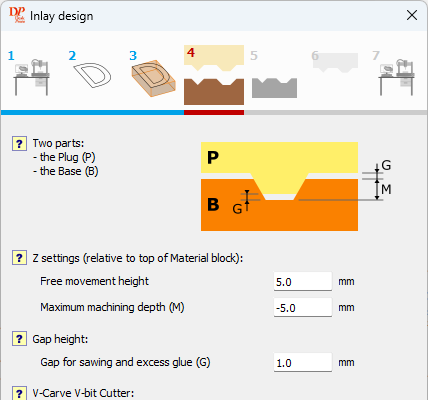
The design page of the Inlay wizard.
In Version 8.0 V-Carving toolpaths have been added to DeskProto, making it possible to create detailed inlays. This does require some complicated settings, and users have asked us if we could make this process easier. The result is this new Inlay wizard in Version 8.1.
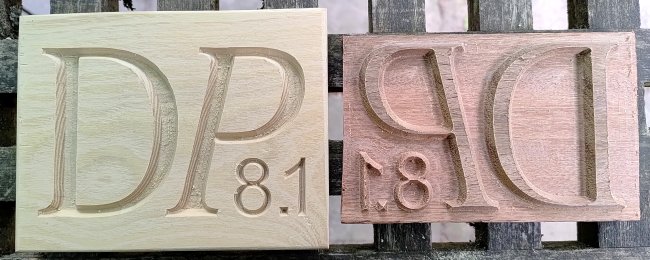
The base and the plug for a simple inlay.
You only need to set the Maximum machining depth and the Gap height, the wizard then makes all settings needed to machine the base and the plug for your inlay.
Extra Vector curves
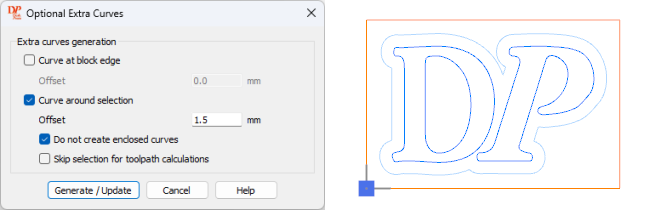
The extra curves dialog, and an offset curve screenshot.
For the inlay wizard it was needed that DeskProto could generate some extra vector curves:
- a Curve at the block edge is used in the plug, to remove all material around the design.
- a Curve around selection is used in the plug, to limit the area to be machined with the V-bit.
For both curves you can set an Offset to be used when calculating the new curve.
You can find a button to set the Optional Extra curves in the Edit curve selection dialog.
These extra curves will be handy in many other situations as well !
Dogbone fillets
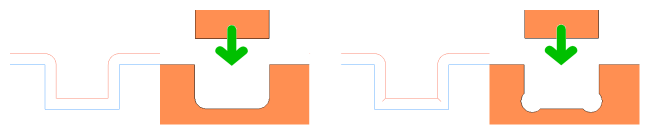
Left the normal toolpath for a curve with two sharp inner corners,
right the result when dogbone fillets have been applied.
right the result when dogbone fillets have been applied.
A longstanding wish, mentioned by several users, was for an option to add Dogbone corners. The image above shows why these are needed, for instance when two parts need to be assembled. As a cutter cannot create sharp inner corners the part to be inserted will not fit. The solution is to add a small extra toolpath that removes just as much material as needed.
The resulting shape resembles a dog's bone, hence the name of this fillet.
You can find this new option on the Profiling tab of the Vector operation parameters.
Bitmap Laser engraving
Laser engraving a bitmap image, also possible projected on a 3D geometry.
DeskProto V8.0 already supported laser engraving, however, only for vector data. In DeskProto V8.1 you can also engrave a bitmap image: use the laser to create shades of gray. Which is not new: many programs offer that option. DeskProto offers more though: 3D laser engraving. You can project the engraved image on a 3D geometry, like shown in the video above.
DeskProto also offers the option to perform a collision check, to make sure that the laser nozzle will not collide with the 3D part (which could happen in case of steep surfaces).
The video above shows bitmap engraving a small dish: linden wood, CNC machined using DeskProto. The laser is 5.5 W with a 0.1 mm kerf width, and in DeskProto these settings were used:
Toolpath distance 0.2 mm, stepsize 0.1 mm. Feedrate 600 mm/min.
Use varying laser power for the gray values, from 0% for white to 100% for black.
No overscan (this machine reduces laser power when decelerating), pass count 1.
Rotary animation in true orientation
Left an animation with a static part, right with the new option to show the true orientation.
The rotary animation in Version 8.0 showed the part and the toolpaths in a static orientation, with the cutter rotating around the part. That is not what happens on the machine: in the true orientation the cutter remains in a vertical position, while the part rotates. In Version 8.1 a new option has been added to the animation dialog: Show true orientation.
More new features and fixes:
The new version comes with more nice new features:- Vector machining:
- Starting depth for a vector operation. All vector toolpaths started roughing at the top of the block, which could result in machining air. Now you can set at which Z-Height to start.
- The results for pocketing strategy parallel were not accurate: now a profiling contour is added automatically.
- Borders for a Vector operation. Just as for Geometry operations: sometimes the cutter needs to stay inside the block of material, and sometimes you want the cutter to move (just) outside the block.
- Collision checks are now also possible for Vector machining.
- Calculations:
- Maximum rotary feedrate for the 4th axis. Rotary toolaths could result in an impossibly high rotation speed. Now you can set a maximum, in the machine definition.
- A collision check for the laser nozzle is now possible.
- When using a multiple diameter cutter with a thicker shaft DeskProto will alter the toolpaths to prevent collisions. You now are warned when this happens, as the resulting part is no longer correct.
- Faster toolpath calculations.
- The libraries:
- A search filter for each library has been added, to quickly find what you need.
- The cutter library now also shows cutter number and type.
- It is now possible to define a cutter with a shaft that is thinner than the flute.
- Various:
- In each project an option 'Notes' now is present, allowing you to store information about the project.
- Extra commands have been added to the context menus in the project tree.
- Faster drawing of a simulation. Simple simulations (like the block before calculating the operations) now are drawn much quicker than before.
Of course (as always) various small bugs have been fixed and many small layout improvements have been applied.
Updates
DeskProto V 8.1 is a free update for users with a license for Version 8. Simply download and install the new version (it will install next to your existing Version 8.0), your license will be recognized automatically.Users of older DeskProto versions will need to buy an upgrade to V8. Update prices can be found at the Price info page.