




DeskProto user forum
Forum: communicate with other users
|
|
| page 2 of 3 |
Hello all, Newb here with his first post. I was glad to see this brought up. I'm using Mach 3 with a Taig mill and would like to be able to insert the actual chosen tool/cutter into the beginning lines of the post processor so that it shows up when loading the Gcode. Could someone please help me to do this if it's possible? It's very handy to be able to see exactly what tool is needed rather than jotting down notes everytime ;o) I've played around with the Post Processor editing options but did not see this anywhere. Thanks for your time- Dave |
|
Hi Dave, You have correctly checked the options in the postprocessor dialog, as unfortunately this is not possible. Of course you can enter any command line in the "Start commands", however what you would need is some intelligent line, that knows which cutter has been selected. And that information currently cannot be called from the postprocessor. You have a point though that it would be a nice option, and in fact it has been suggested before. So it is on our list of imprevement ideas. However, as this is a very long list I cannot give any expection: at this moment implementation is not yet planned. Lex. |
|
Thanks for the quick answer Lex, much appreciated- Dave |
|
Hi Lex and Dave, The postprocessor Tool Change can post the tool number in the G-code, but the text for that tool number depends on the way you write the code to be posted. As I only know FlashCut's format, Mach 3's M-code for tool change is probably different, so am unsure of what happens when executed. I include this image and explanation of the tool change I wrote to demonstrate that the tool number and tool description work in FlashCut's control software. Pluke |
|
 Hi Lex and Dave, I sent the wrong format for the picture then converted to jpeg but did not work; I will try again. Having thought a little, just the tool number is passed from DeskProto when it generates the G-code. The tool's description is supplied by the controller's tool library when the G-code runs. My example of mismatched discriptions for the same tool number demonstrates what happens if you follow the description rather than the actual tool. So it is important to define the tools correctly so they match between toolpath generator and controller. Pluk |
|
Hi Dave, Perhaps my recent contribution seems off course. Start with a blank tool list. If your controller's software, Mach 3, has no Tool Library or the Tool numbers are not yet defined, then the DeskProto Tool Library will be the permanent tool number list. As you define new tools, the list gets long and hard to remember. On a piece of paper or word processor or Notepad, keep a Tool number list to view by the toolrack and the computer screen. For example, Tool #12 will always be the same cutter you used to generate the toolpath and G-code in DeskProto and will be the same real cutter you define even if you build a Tool library in Mach 3 or any other controller software program. When Tool #12 is in the Project or G-code or controller's on screen display, then your Tool Library list describes the cutter. Same idea for each tool number. I have around 60 tools defined in my Contoller's Tool Library. To correct my own mismatch, I would need to find the correct tool number for that cutter and change the tool number in the DeskProto Tool Library, then redo the tool selection and rerun the toolpath and generate new G-code. Like you, I am just starting, eventually adding many cutters to DeskProto. I am just moving from the trial version to the full version. You may want to organize tool numbers by tool type for example: ballnose cutters occupy #10 to #29 and flat endmill cutters #30 to #49 and vee cutters #50 to #69.... It is easy to understand why you want the tool description posted in the G-code to remind you which tool to use for the toolpath. I think you were looking for something like a string variable to post the description to the G-code, generally: A(toolnumber)$ = "Use tool #",toolnumber,B(toolnumber)$ where B(toolnumber)$ = "tool's description". Hope this enlightens you in the right direction. Pluk |
|
Hi Pluk, That's actually not a bad idea at all using the toolnumbers, that would indeed be the way to go. I also use Vectric's VCarve Pro, and they have made me very "lazy/spoiled", as they provide this exact "naming" feature in their Post Processor. Thank you for your input, you've definitely given me something to think about. I actually have all my tooling laid out in such a way that when I run a Code from VCarve, I know exactly where to look since the tiool is called out in the beginning of each code, not numerically, but the same idea. Thanks, Dave |
|
Hi Pluk, hi Dave Thanks for this suggestion: it is a great idea to use the Toolchange command to make DeskProto output a comment line - I should have thought of that option. The limitation indeed will be that the toolchange command can insert only the Number of the cutter in the comment line, not the name (or description) of the cutter. Do note that configuring a toolchange command will make DeskProto behave differently when saving the toolpath file: - without a toolchange command DeskProto will start a new file when a different cutter is needed - with toolchange command DeskProto will write one large NC file for all operations. So in addition to the comment line in the Toolchange command, you will also need to configure some line that will make the machine pause in order to chnage cutters. Lex. PS: We will look at this Naming option in VCarve. Competing programs are useful to keep software developers sharp :-) |
|
Hi Lex, Dave, and Postprocessor writers, Using Tool numbers to identify and pass tool information from DeskProto to your machine's controller is not difficult but does involve a few steps to setup. First in Options>Library of Machines..., set Number of tools to what your controller can handle. Example: FlashCuts tool Library goes to 100; so, I set 100. You could do 10,000; I tried it. Second in Options>Library of Cutters..., when you define a tool, set the tool number in the Automatic Tool Changer>Number in machine 74. Also good to name the tool with the number. Number your cutters as you define them. Example: Name> T74 0.0625" x 1.0" Diamond cut x 1.5" long 36mm free and Number in machine> 74 Third in Library of Postprocessors...>Tool Change tab>Use change-command in NC-program: The Start command will be M4 (ALL OFF), dont need to check the tool nr. here, then End command G28 goto Tool change Position. Example: M4 (ALL OFF) no check ^backslashNG0 X+0,Y+0,Z-3 I prefer to write the toolchange position rather than G28 reference point. The next Start command will be M06 T check Tool nr. End command M12 (Tool Light ON) (FlashCut PAUSES), or Pause if your controller does not automatically pause here. Example: M06 T74 M12 will be posted in the G-code on one line. Your controller's Tool change command syntax may be different, write carefully. Fourth in Library of Postprocessors...>Spindlespeed tab> check Use StartCommand (S check Tool nr. EndCommand rpm) M07 (Mist Coolant ON) StartCommand several linefeeds no check (-Rapid Movement to START POINT-)linefeed. If you have a Spindle controller, write the syntax to set the speed. Thus far, DeskProto's order of posting G-code is: Startcommands from Start/End tab Tool Change tab Spindlespeed tab toolpaths> Rapid, Movement, and Feedrate tabs as they arise Endcommands from Start/End tab Do not use Tool length compensation as DeskProto's toolpath is calculated based upon the cutter definition in the Library of Cutters. Make sure your machine's Controller is not compensating, usually adds or subtracts from Program Z coordinate, and everything runs as expected. The above example posts G-code something like this: (-----INITIALIZED------) (--ALL OFF-- Work Lights ON) (RETRACTED Z-axis -ZERO) (-PROGRAM ZERO-) (--READY for TOOL--) M4 (ALL OFF) G00 X+0. Y+0. Z -3. (Tool Change Position) M06 T74 M12 (Tool Light ON) (FlashCut PAUSES) G00 Z 0.0 (RETRACT) M03 (Spindle ON) (S 2000 rpm) M07 (Mist Cool ON) (-Rapid Movement to START POINT-) G00 X+2.6175 Y-0.0313 Z +0.2 G01 Y-0.0313 Z +0. F 3.0 Y-0.0313 Z -0.5217 F 1.5 X+3.3651 Y-0.0294 toolpaths (------END & RESET------) G00 Z 0.0 (RETRACT) M04 (ALL OFF) M12 (Tool Lights ON) M13 (Work Lights ON) G00 X 0.0 Y 0.0 Z 0.0 (To PROGRAM ZERO) M30 (END & RESET) (use M02 END if Chaining Files) Depending on your controller's syntax preferences, you can put commands on the same line in the postprocessor,and still post them on a new line with a linefeed ^backslashN If you can comment your G-code, take time to format the text. Spaces and alignment keeps it interesting as this posts everytime you generate a G-code file. Pluk |
|
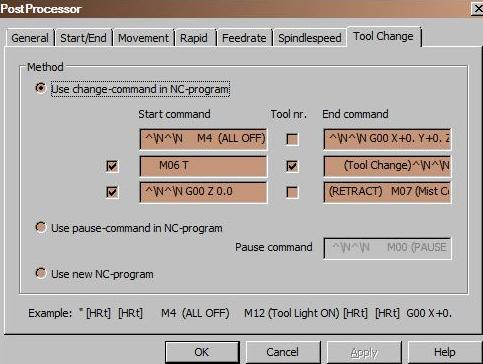 Hi Lex and Users who change tools, Edit Postprocessor to fix command orders and line spacing for tool change with three Operations: Roughing, Finish, Rest 1/4" 1/8" 1/16" diameter tools Lex mentioned mutiple Operation toolpaths will chain together into one file if you select Options> Library of Postprocessors...> Tool Change> Method> Use change-command in NC-program. Use Pause-command in NC-program also chains operations but without the tool number functionality, and does post Spindlespeed. Use new NC-program does not chain but posts each operation in the Operation tree separately with a #1_Roughing, #2_Finishing, #3_Rest or whatever you name your Operations added to the files' name, so you remember the sequence. No tool number functionality. Good for long toolpaths. Add a tool number to the filename to remind yourself. You may want to write a separate postprocessor to add extra M-codes in [StartEnd] replacing the missing tool change. ----- To create a break in the G-code at Tool Change, I removed last two linefeeds in [StartEnd] tab and added two linefeeds on the Tool Change tab first Start command. The result creates a visual break in the G-code at each tool change. My controller's Tool Change command Pauses the G-code execution and I manually lock the spindle shaft and use a wrench on the collet; I also set my spindle speed rpm manually and post an rpm comment which uses the Spindle tab in DeskProto. I do not want the spindle to run until I get back to resume, Start, the Program execution. If you do not have a Tool Change command that Pauses the G-code execution, turn off the spindle, position the spindle where you want to change the tool, and issue a Pause command. FlashCut defines M00 Program Pause G-code execution and puts a notice on screen to press Start to resume. Your controller's commands may be in a reference manual or help file. A tool change done manually can benefit from posting the tool number as a comment in the G-code to inform the user of which tool to load for the next toolpath in the sequence. On my machine, the Tool Change command is simply a fancy Pause command with a tool number attached to specify the tool defined for that tool number to be loaded on the spindle. I use DeskProto's automated tool change numbering system to pass the tool number to the controller where a Library of numbered tools puts a message on the screen with tool number and tool description to load. Therefore, I run semi-automatic. If I mount a Tool Change Collet and setup a tool rack or tool torret and modify the controller's software not to Pause, add a tool picker subroutine and return to execute the next toolpath, I would be fully automatic except for spindle speed adjustment which also can be automated. Be careful in the sequencing of commands. It may require you to edit the postprocessor several times until you get a safe and satisfactory result. Time well spent here will be posted everytime you create a G-code file of toolpaths to run and you will know what is going to happen at the machine as a routine experience. It took more time to write this explanation than to do all the postprocessor editing. DeskProto's order of posting G-code is: Startcommands from [Start/End] tab Tool Change tab First Operation Spindlespeed tab toolpath> Rapid, Movement, and Feedrate tabs as they arise Tool Change tab Second Operation Spindlespeed tab toolpath> Tool Change tab Third Operation Spindlespeed tab toolpath> Endcommands from [Start/End] tab Example of 3 Operation post: Refer to my double spaced example postprocessor as I have changed the [Tool Change] and [Spindlespeed] commands. . . Startcommands from [StartEnd] tab . F16.0 (Default inch/min Feedrate) (-----INITIALIZED------) (--ALL OFF-- Work Lights ON) (RETRACTED Z-axis -ZERO) (-PROGRAM ZERO-) (--READY for TOOL--) removed two linefeeds M4 (ALL OFF) M12 (Tool Light ON) G00 X+0. Y+0. Z -3. (Tool Change Position) M06 T98 (Tool Change) ( G-code PAUSED by Controller ) G00 Z 0.0 (RETRACT) M07 (Mist Coolant ON) (S 18000 rpm) M03 (Spindle ON) (--RAPID MOVE to START POINT--) G00 X+0.0614 Y+0.0977 Z +0.2469 G01 Y+0.0977 Z +0.05 F 16.0 G00 Y+0.0977 Z +0.2469 X+0.0477 Y+0.1114 G01 Y+0.1114 Z +0.05 Y+0.0841 X+0.0614 Y+0.0568 . . Roughing toolpath . X+0.1932 Y+0.2705 X+0.2114 Y+0.2568 G00 Y+0.2568 Z +0.2469 M4 (ALL OFF) M12 (Tool Light ON) G00 X+0. Y+0. Z -3. (Tool Change Position) M06 T1 (Tool Change) ( G-code PAUSED by Controller ) G00 Z 0.0 (RETRACT) M07 (Mist Coolant ON) (S 18000 rpm) M03 (Spindle ON) (--RAPID MOVE to START POINT--) G00 X+0.06 Y+0.0993 Z +0.1969 G01 Y+0.0993 Z +0. X+0.065 Y+0.087 X+0.0723 Y+0.0723 Y+0.0993 X+0.06 . . Finish toolpath . X-0.0551 Y+0.1556 G00 Y+0.1556 Z +0.1969 M4 (ALL OFF) M12 (Tool Light ON) G00 X+0. Y+0. Z -3. (Tool Change Position) M06 T74 (Tool Change) ( G-code PAUSED by Controller ) G00 Z 0.0 (RETRACT) M07 (Mist Coolant ON) (S 18000 rpm) M03 (Spindle ON) (--RAPID MOVE to START POINT--) G00 X+0.0679 Y+0.0956 Z +0.1969 G01 Y+0.0956 Z +0. Y+0.0963 Y+0.0956 . . Rest toolpath . X+0.1095 Y+0.1411 X+0.1121 Y+0.1392 G00 Y+0.1392 Z +0.1969 (------END & RESET------) G00 Z 0.0 (RETRACT) M04 (ALL OFF) M12 (Tool Lights ON) M13 (Work Lights ON) G00 X 0.0 Y 0.0 Z 0.0 (To PROGRAM ZERO) M30 (END & RESET) Make sure when defining the DeskProto cutter to assign the tool number to match what the controller expects as that tool number. Check the posted file when you do a new definition to avoid mistakes later when cutting. You will be happy to have taken a few minutes to write a postprocessor which will function correctly each time you generate a G-code toolpath file. This is the second postprocessor I have ever written. If you find a mistake or have a different way, please post a reply to the forum. Pluk |
|
| page 2 of 3 |