




4-axis CNC on a Onefinity machine
CAM software for the Rotary module: Fusion 360 or DeskProto?
Onefinity CNC is a young company (founded in 2020). They claim to have 'reinvented the CNC experience', by offering machines that are 'designed to grow from hobby projects to professional production'. The company is based in and the machines are made in North America.

The Onefinity Elite Foreman machine.
Onefinity can delivery their machines with three different controllers:
- the Buildbotics controller supports a subset of LinuxCNC, see this G-code manual. So in DeskProto you can use the LinuxCNC postprocessor.
- for the Masso controller DeskProto already contains a postprocessor. Several DeskProto users are running a Onefinity machine with a Masso controller.
- for the Redline controller a postprocessor has been added in April 2026 (Rev 12739). The situation is a bit confusing: some users report that it works, some report that it does not. Perhaps more than one type is available? It may be that you need to switch off Inverse Time feedrate in the Redline postprocessor.
The Onefinity rotary module

Three versions of the Onefinity rotary module
On the Onefinity user forum a post is present about using the rotary module, called "The Revolution". In this post user Greecher (Dave) describes his complete journey to success, on his machine with a Masso controller. All with ample screenshots and photos. He:
- changes the machine's configuration to make the rotation axis work
- compares Fusion 360 with DeskProto and explains why he prefers DeskProto
- describes how he fine-tuned the machine definition and the postprocessor in DeskProto
- shares all project settings that he made in DeskProto
- shows the results.
Dave: thanks for sharing !
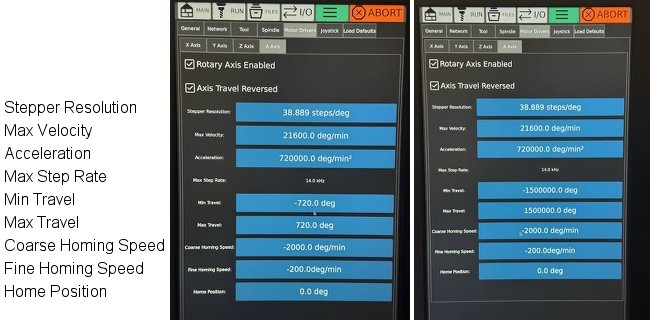
The min and max travel values for a rotary axis in the Redline settings.
One more comment about the Redline controller: with the Onefinity default settings it does not support angles over 720 degrees for the rotation axis, making a Helix option impossible. In the Redline settings you can change the minimum and maximum travel values for the rotation axis in order to make a helix possible. The value of 1500000 degrees in the illustration is random: it just needs to be high enough. Onefinity has not (yet) confirmed that this is correct, still a user reported that it works fine.
The Onefinity laser engraving modules
This paragraph applies only to DeskProto Version 8, as the previous DeskProto versions do not support laser engraving.One of the optional extras that Onefinity offers is laser engraving, using a laser module. DeskProto V8 can create toolpaths for laser engraving, though we have never yet tested that on a Onefinity machine. Please let us know if you have tested or would like to test this.