|
Dear John Smith,
We are happy to send you this next new issue of the DeskProto newsletter, about
"CNC machining for non-machinists". We hope that you will enjoy reading.

|
The DeskProto version for Linux is ready !

DeskProto now is also available for Linux users, as
native 64 bits AppImage (this will work on
various Linux distributions). Projects made on Linux, Mac and
Windows are interchangeable. Licenses for DeskProto V7 can be used to
activate DeskProto on Linux, on Mac and on Windows,
so existing users can switch to Linux without extra cost.
The software can be downloaded at
www.deskproto.com:
in the last step of the download process you can choose to download
a Windows setup file, a Linux
AppImage file or an Apple disk image file. More information about AppImage files in the updated
Tutorial book.
We are very happy that the DeskProto CAM software now is available on
all three major operating systems. Please spread the word about this new release !
|

|
New DeskProto workflow videos

Three new tutorial videos have been released since the previous
newsletter email: the Linux release video, and two tutorials on the
DeskProto workflow.
The
Linux release video
shows DeskProto running in Ubuntu. The basic
bitmap wizard is used to create toolpaths for a 3D relief of Tux
(the penguin Linux mascot).
The
first workflow video
tells about the overall picture of CNC and the place
of DeskProto in the process. Next the three basic wizards are
demonstrated: Vector machining, Geometry
machining and Bitmap machining.
The
second workflow video shows the user-interface
in more detail: while creating toolpaths for a 3D geometry
(a perfume bottle) most controls on DeskProto's screen
are shown and explained.
You can find all videos both on our website and our
YouTube
channel.
|
|
Version 7.1 will bring exciting new features

After more than 2 years of
software development DeskProto Version
7.1 is getting close !
Some more time will be needed
for the final details, after which we can start with all
translations (9 extra languages!), the manuals and the help file. At
that time we can also start beta testing: email
us when you want to be active as beta tester (apply only when you
have time to test and send us feedback).
The new version will bring exciting new options, like
• Simulation for rotary toolpaths
• Rectangular block for rotary machining
• Many new postprocessor options
• Curve selection per Layer in the DXF drawing
• Ramping also over a curved first toolpath.
DeskProto V7.1 will be a free upgrade for users of V7.0 !
|
|
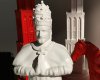
Utrecht chess set with iconic figures

We were excited to hear about this DeskProto project in Utrecht:
our own home town. DeskProto user Jules Dock
Shaping created a large size chess set for the city, featuring
six iconic figures from the city's history as chess pieces.
From pope Adrian
VI (the bishop) to
Miffy the small rabbit (the pawn).
The set can be seen at the Utrecht Archives,
where you can use it to play a game of chess.
Thanks for sharing !
Read all about the project on the new
Chess set Gallery page.
|
Try for yourself and download the DeskProto
Free edition from our website. To get
started you can use the tutorials (both video and PDF) and the sample geometries.
This is all possible completely free of charge !
Best Regards,
Lex Lennings.
This
DeskProto Newsletter mailing is sent a few times per year.
It is sent to you as on dd/mm/yyyy you have explicitly requested us to do so,
see our privacy statement.
To be removed from our mailing list, reply with the following text in the Subject line:
"Please remove me from this mailing list".
|
|